Put the words up, calmly.
UShow is free presentation software for churches. Songs, Scripture and media go to the room's screen and the band's screen from one window.
Coming from ProPresenter? UShow reads your library in one click, sections and arrangements included, and never changes the original files. How the import works
Version 1.0.4, free, for macOS 10.15 or later and 64-bit Windows 10 and 11.
Mac build signed and notarized by Apple
Preview waiting to go up
I once was lost, but now am found
Live on the room's screen
That saved a wretch like me

The real app, mid-service. Every picture on this page is a screenshot of the shipped program.
Ready for Sunday in three steps
-
Get the words in
Type or paste the words and UShow splits them into slides. Look up a Bible passage by its reference. Bring a PowerPoint, a PDF or a whole ProPresenter library across.
-
Put the service in order
Line up songs, readings, notices and videos in the order they happen. Change it right up to the last minute.
-
Preview, then Take
Click a slide to line it up in green. Press Take and it goes red, which means the room is now looking at it. Nothing reaches the screen until you say so.
What the congregation sees
One screen, one job: the words, big enough to read from the back row. No panels, no cursor, no notifications.

-
Songs that keep their shape
Mark each verse, chorus and bridge, then sing them in any order. Every section keeps its colour, so you can find the bridge mid-song without reading.
-
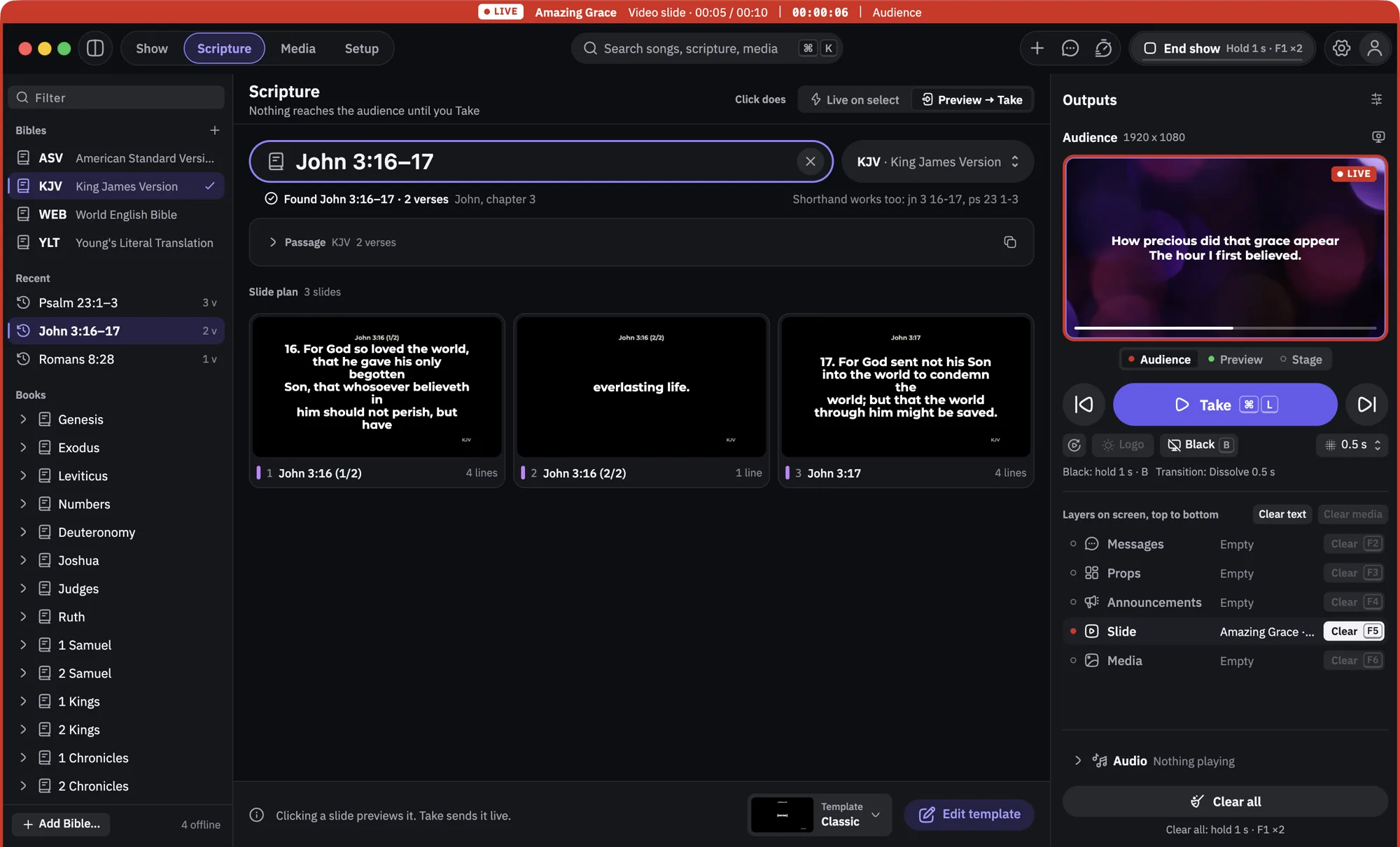
Scripture, built in and offline
Type a reference and UShow splits the passage into slides. Four public-domain Bibles come with the app: King James, American Standard, World English and Young's Literal.
-
Pictures and video behind the words
Play an announcement video, show a picture, or put a moving background behind the lyrics. Backgrounds cross-fade with the slide instead of cutting.
What the band sees
A second screen facing the platform, showing the people leading what the room cannot see: what is coming, how far through they are, and anything you need to tell them.

The same screen comes in three layouts, because the person holding a guitar and the person about to preach want different things from it.
Speaker
Now and next, a clock, and how far through the song you are. Shown above.
Band
The whole next slide underneath the current one, so nobody misses the change.
Lyrics
Just the words being sung, as large as they will go.
-
A word from the booth
Send "Wrap up in 2 minutes" to the stage screen without the room seeing it. Start a countdown they can watch. Both land on the stage screen only.
You do not have to be at the desk
The person running the slides is often also the person on the sound desk, or holding a camera, or sitting with their family.
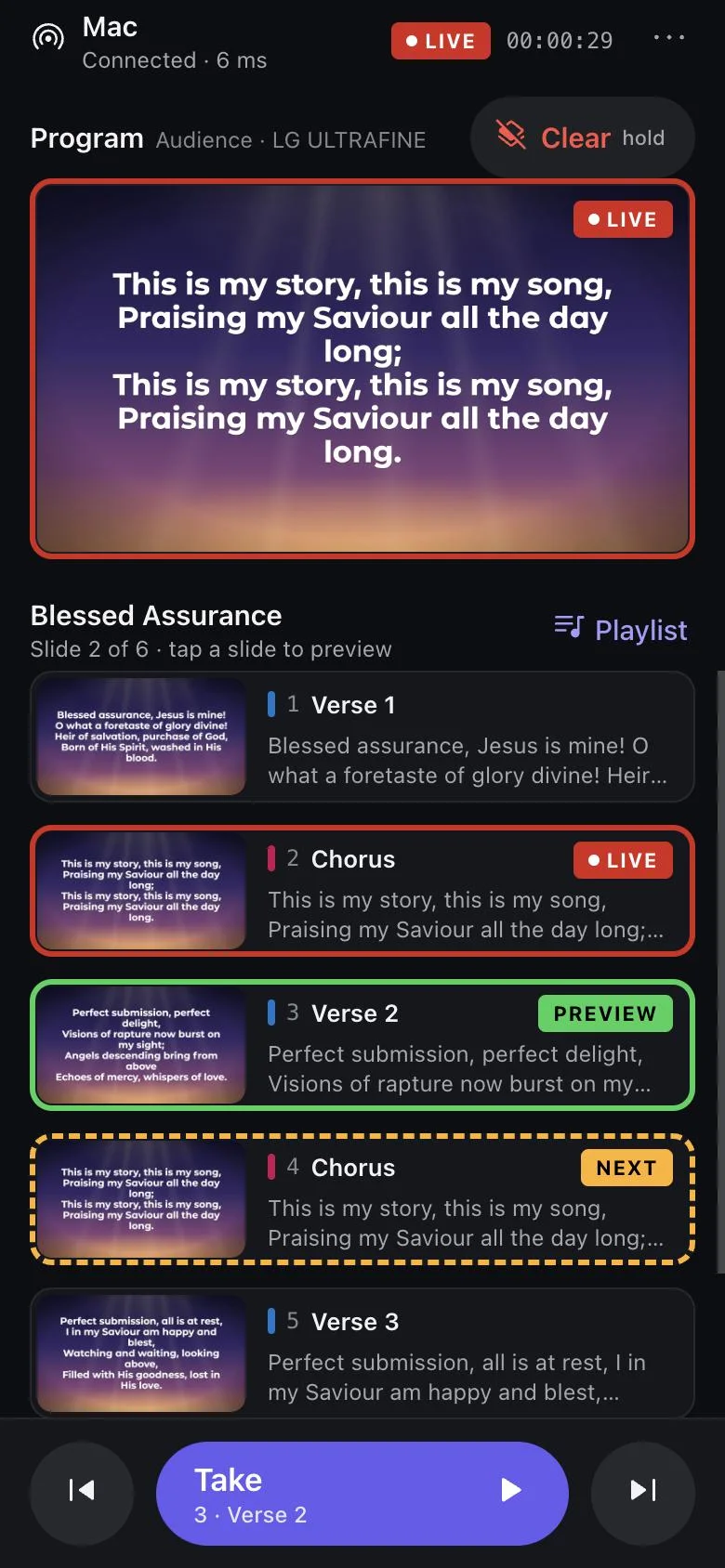
A remote in your pocket
Open the remote in your phone's browser on the church Wi-Fi and move the slides from anywhere in the room. It shows what is live, what is waiting and what comes next, with the same red and green. Nothing to install, and no internet needed.
-
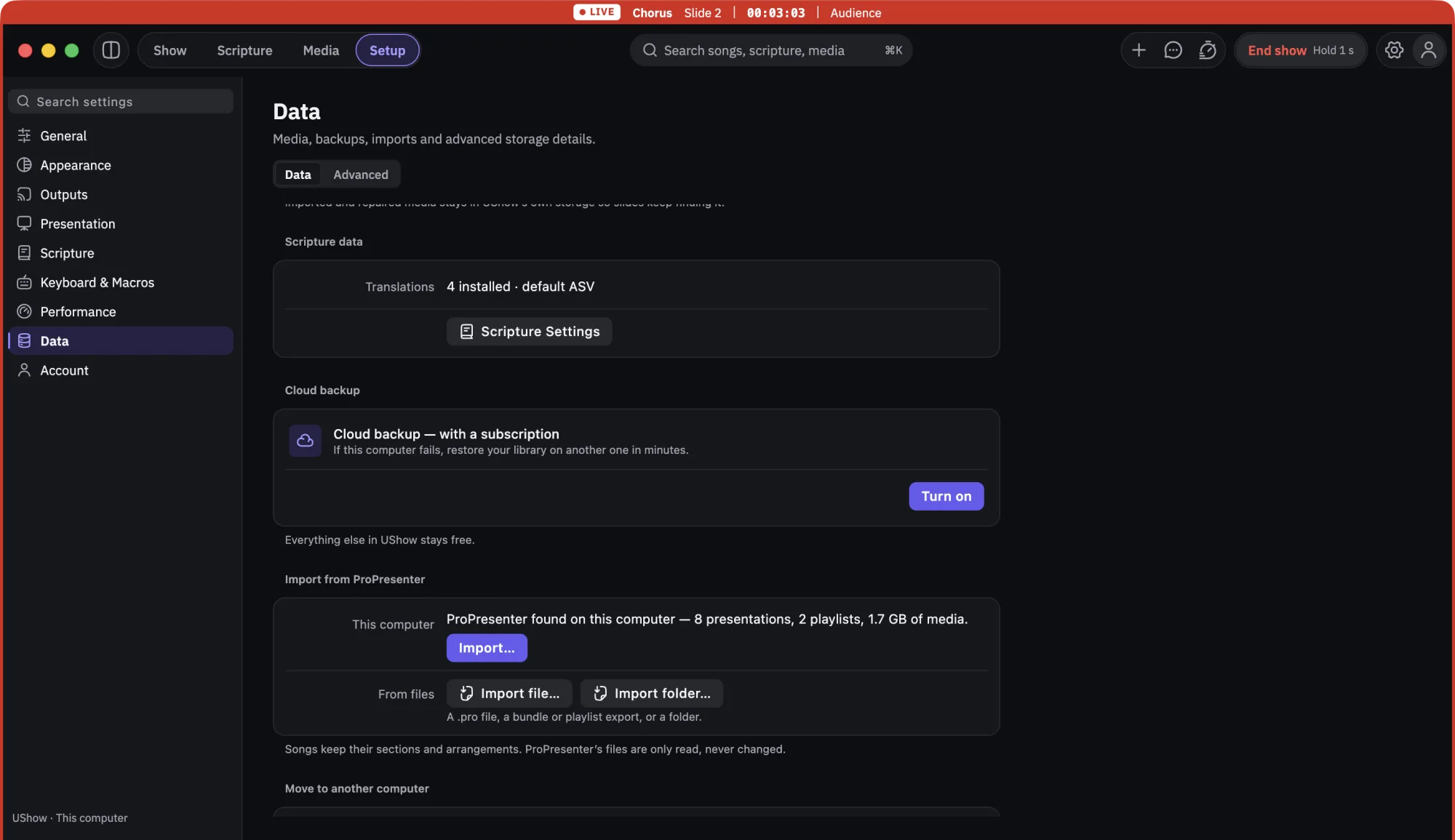
Your ProPresenter library, in one click
UShow finds ProPresenter 7 on the same computer and brings over songs, presentations, playlists and media. Songs keep their sections and arrangements. UShow only reads ProPresenter's files and never writes to them, so nothing you already rely on changes. ProPresenter 6 and older are not supported yet.
-
A clean picture for the livestream
Send the room's screen to OBS or vMix over NDI, without pointing a camera at a projector. This one needs the free NDI runtime installed once on the computer.
What you are actually downloading
A church computer is not a place to be vague, so here is the whole picture, including the parts that are not finished.
- Free, and not a trial
- Download it, run your services, keep using it. No account, no card, no time limit. Cloud backup of your library is the only part that is ever meant to cost money, and it is not on sale yet. We will say so plainly here before anything does.
- The Mac build is signed by Apple
- Signed and notarized, so macOS opens it without argument. Every download lists a SHA-256 you can check against the file you received.
- The Windows build is not signed yet
- Windows will show "Windows protected your PC" the first time you open it. That is the missing certificate, not a problem with the file. The download page shows the exact warning, which publisher line to expect, and how to install without an administrator password. We are working on the certificate.
- It works with the internet off
- Songs, Bibles, media and every screen run locally. The phone remote needs the phone and the computer on the same Wi-Fi, not a connection to the outside world.
- Who makes it
- UShow is built by ERZTECH TECHNOLOGIES LIMITED, a company registered in Nigeria. Write to support@u-show.app and a person answers.
Questions churches ask
Cost and accounts
Is UShow really free?
Yes. You can download UShow and run your services without paying and without an account. Cloud backup is the only part intended to be paid for, and it is not on sale yet.
Do I need an account?
No. Everything runs on your own computer. An account only exists for cloud backup of your church's library.
Do I still need a CCLI licence?
Yes. If your church needs a licence to show song lyrics, it needs one with UShow too. UShow does not include song licences.
Setting it up
Is there a Windows version?
Yes. UShow 1.0.4 runs on 64-bit Windows 10 and 11, and it is on the download page now. The Windows build is not signed yet, so Windows shows a warning the first time you open it. The download page shows exactly what you will see and what to click.
What do I need to run it?
One computer, and a projector or TV connected as a second display. A third screen facing the platform gives the band their own view. Set the displays to extend, not mirror. The download page walks through it for both Mac and Windows.
Does it work without the internet?
Yes. Songs, Bibles, media and every screen work offline. The phone remote needs the phone and the computer on the same Wi-Fi network, not the internet.
Can I bring my songs from ProPresenter?
Yes, from ProPresenter 7 on the same computer. UShow reads your library without changing it, then shows you what came across and anything it could not bring. Older ProPresenter versions are not supported yet.
Who can I ask for help?
Email support@u-show.app. The support page says what to include so we can answer quickly. We are a small team, so set up and rehearse a day or two before the service rather than during it.
Try it before your next service.
Download it today, put a song in it, and run through next Sunday on the real screens. That is the only test that counts.
Version 1.0.4, free, no account. macOS 10.15 or later, or 64-bit Windows 10 and 11.